
CAMERA 01
The host.
Recall a close-up, adjust framing and zoom without walking to the camera.
Turn supported DJI Pocket cameras into a coordinated multi-camera studio system, with pan, tilt, zoom, presets and production-control integrations.
Multi-Camera Control for DJI Pocket 4P by willdylan.tv
 ● THREE-CAMERA WORKFLOW
Camera settings, a gimbal joystick, zoom, recording and saved positions share one production workspace.
CamSynq Pocket Studio · Control workspace
Give each Pocket camera a role, save your framing, and control the system from one production position.
Recall a close-up, adjust framing and zoom without walking to the camera.
Move between saved positions or make fine PTZ adjustments during the session.
Keep a wide master shot ready for transitions, resets and two-person conversations.
Bring supported DJI Pocket cameras into one control workspace.
Set host, guest, wide and other repeatable positions.
Adjust cameras from the interface or your production-control buttons.
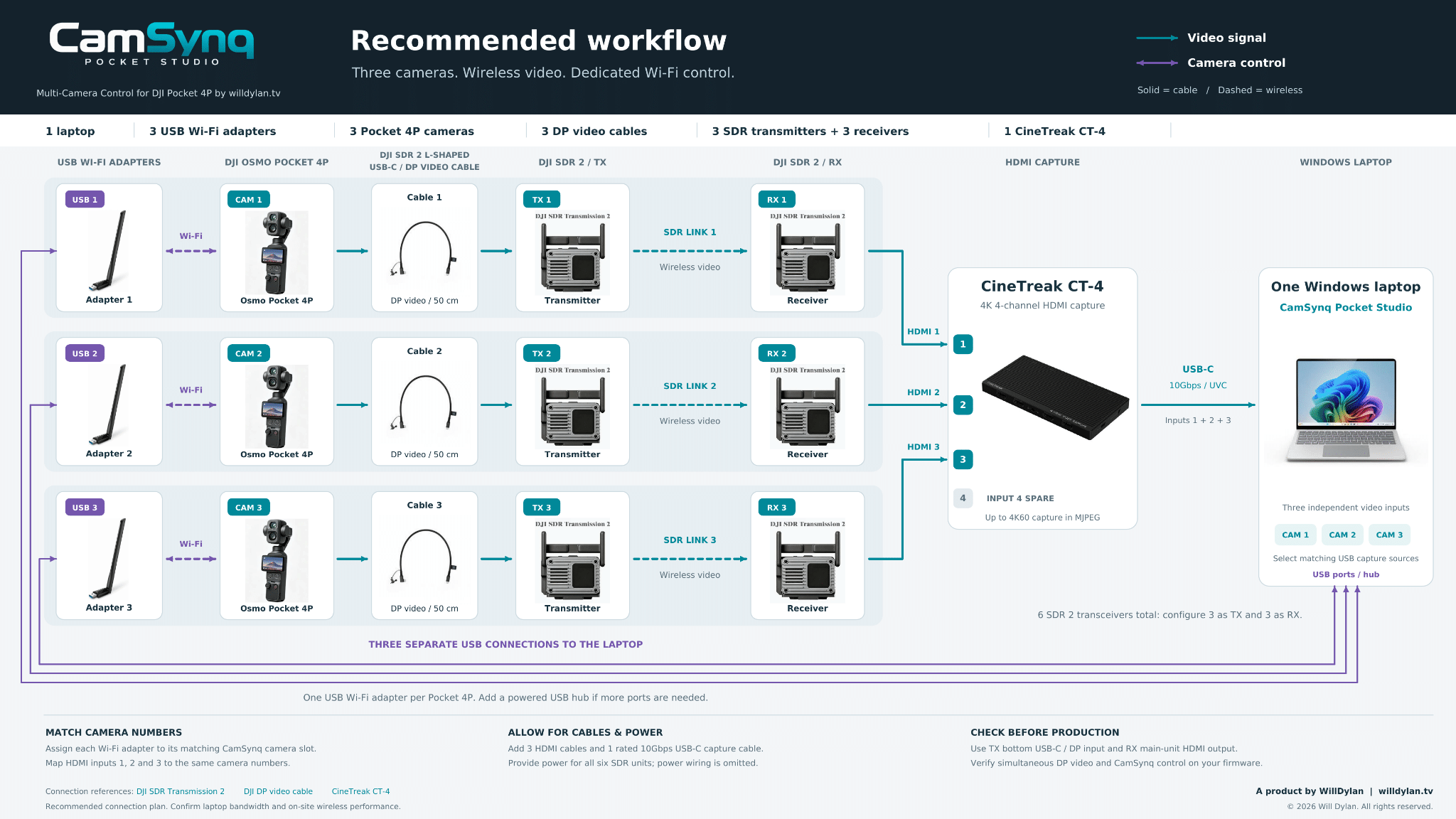
Three cameras. Wireless video. Dedicated Wi-Fi control.
Give each camera its own transmitter and receiver, then bring all three feeds into the laptop.
Repeat the camera → TX → RX chain three times.Use one DJI SDR 2 L-shaped USB-C / DP video cable per camera. Connect each receiver to its matching CT-4 HDMI input.
One capture connection to the laptop.Use a rated 10 Gbps USB-C cable for the CT-4 UVC connection. Select the matching capture sources; HDMI input 4 stays spare.
Keep a dedicated Wi-Fi connection for each camera.
Plug all three adapters into the laptop. Add a powered USB hub if more ports are needed. Camera control uses Wi-Fi; the video feeds travel through the SDR and capture path above.
Allow for cables & powerUse 3 DP video cables, 3 HDMI cables and a rated 10 Gbps USB-C capture cable. Provide power for all six SDR units.
Use the correct video portsUse each transmitter’s bottom USB-C / DP input and each receiver’s main-unit HDMI output.
Check your complete setupTest simultaneous DP video and CamSynq control on your firmware. Confirm laptop bandwidth and on-site wireless performance.
Camera movement, repeatable framing and hands-on production control, brought together for a compact studio.
Direct camera movement and framing from a central control station.
Store and recall shots for hosts, guests, products and wide angles.
A practical multi-camera layout for podcasts, interviews and compact studios.
Put common camera actions and preset recalls under physical buttons.
Bring camera actions into your wider live-production control workflow.
Use camera movement data in compatible virtual-production workflows.
Build around the tools you already use to control cameras, switch shots and produce your show.
Host, guest and wide shots controlled from one desk. Keep attention on the conversation.
Compact multi-camera acquisition with repeatable framing for speakers and interviewees.
Coordinate Pocket cameras alongside switching and stream-control tools for your live production.
Start with the complete three-camera workflow in a single licence.
One edition for your 1–3 camera setup.
Planned launch pricing. Final pricing and included features may change before release.
Join the early-access list for launch news, beta availability and the introductory price.